


Official alerts, with their source
Government warnings from weather services, geological surveys and civil protection, plus scientific detections like satellite fire hotspots. Every alert says who issued it.
Live official alerts active right now
The wildfire near your parents’ town. The storm heading for the cabin. The earthquake where your daughter is travelling. You should not have to refresh the news to know if they are safe. Phaenyx Alert tells you when an official warning reaches the places and people you love, and stays quiet when it does not.
Launch offer Free for 1 year · Family plan included · 44 days left
Scan the code with your phone camera, or open this page on your phone. Installs in 30 seconds. No App Store, no account, no card.
Less doom-scrolling, more calm
An alert reaches you only if it touches one of your places, at the level you chose. Everything else stays out of your pocket.
Ten kilometres around home, a hundred around a trip. Only red alerts, or every yellow one: you decide, place by place.
Colour of the level, type of alert, place, time and who issued it. You know what is happening in one glance.
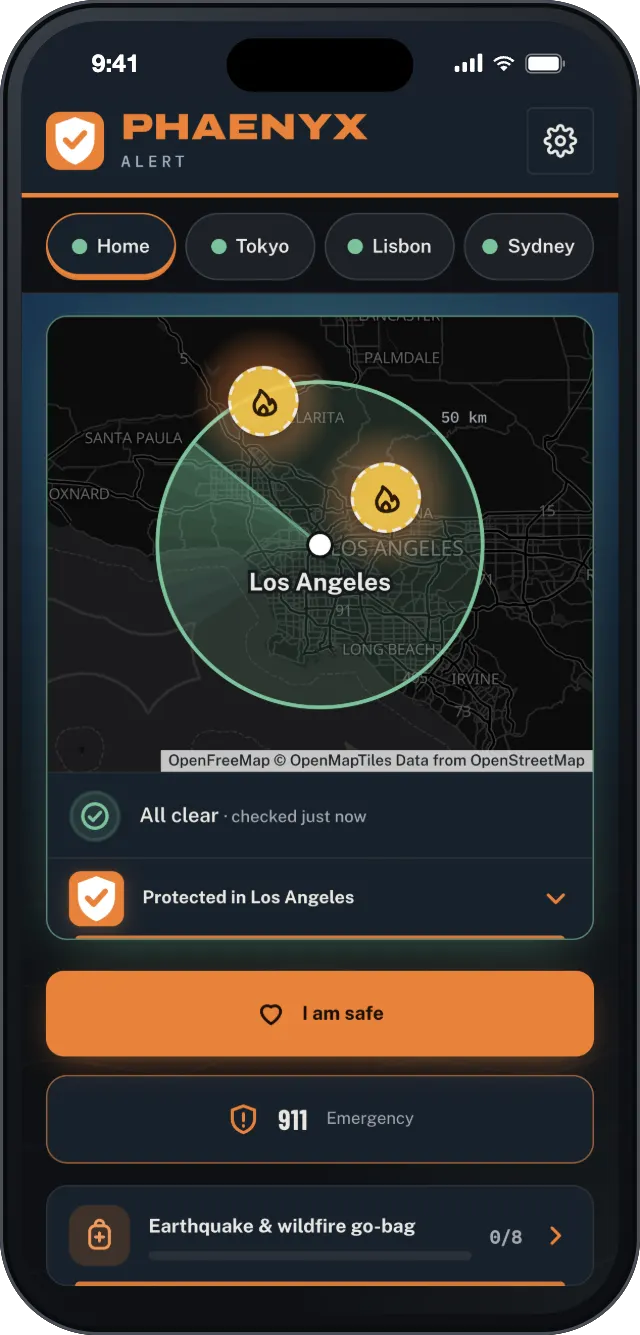
Open the app and you see it at once. Your places are watched, nothing concerns you, you can breathe.
Everything in one free app
Government warnings from weather services, geological surveys and civil protection, plus scientific detections like satellite fire hotspots. Every alert says who issued it.
Storms, heat, cold, floods, earthquakes, tsunamis, volcanoes, wildfires, smoke and air quality, drinking water, avalanches, landslides, solar storms, civil protection and travel advisories.
Your home, your parents across the border, your next trip: one app follows them all, each with the official sources of its country.
Home plus 3 other places: the city you are travelling to, your parents’ town, the cabin. Each place has its own radius and alert level.
Warn yourself and up to 3 loved ones. Each phone watches its own home and 3 more places.
When something happens, one button writes the message. You send it from your own Messages app to the people who are worried.
Each place shows the emergency numbers of its country: 911, 112, 000, 119… No searching when every second counts.
A short checklist adapted to the risks of each place and the time of year: an earthquake go-bag for Tokyo, a wildfire go-bag for Sydney.
Where authorities publish them, national siren tests and drills are announced the day before, so a test never makes your heart jump.
It opens in your phone’s browser and goes on your home screen. No name, no email, no password.
Your places are rounded to about 5 km on your phone before anything is sent. Turn off alerts and everything is deleted.
Launch offer for everyone who signs up before December 31, 2026, with the Family plan included. Nothing is ever charged automatically.
Happening right now
Live official alerts active right now
The phone on this page shows official alerts issued in the last hours around the world, as they arrive. Somewhere, someone is getting this warning right now. With Phaenyx Alert, the next one about your places is sent to your phone as well.
How it works
Scan the code or tap the button. It opens in your browser: add it to your home screen, no App Store.
Home first, then up to 3 more: a trip, your parents, the cabin. Set how close and how serious.
That's it. Phaenyx watches the official sources for you, day and night.
Launch offer
Sign up before December 31, 2026 and the app is free for 12 months from your sign-up date, with the Family plan for you and 3 loved ones. No card, no automatic renewal.
Launch offer Free for 1 year · Family plan included · 44 days left
Scan the code with your phone camera, or open this page on your phone. Installs in 30 seconds. No App Store, no account, no card.
No. Phaenyx Alert does not ask for your name, email address or phone number. It keeps your places, rounded to about 5 km, and the technical address your phone gives for notifications. Privacy policy.
Nothing for 12 months if you sign up before December 31, 2026 (44 days left), with the Family plan included. We do not ask for a card and nothing is charged automatically: before your free year ends, the app tells you what options exist and you choose. Terms.
83 countries, with the official sources of each one and scientific detections worldwide. See the list of countries.
No more than any app that receives notifications. Phaenyx Alert does not follow your position and does not run in the background: our servers watch the sources and your phone only wakes up when an alert concerns one of your places.
No. Phaenyx Alert relays official alerts and scientific detections, but it is not an official warning system. Keep your phone’s emergency alerts turned on, and always follow your authorities’ instructions.
Both. On iPhone, open it in Safari and add it to your Home Screen; on Android, open it in Chrome. The install page shows you how, step by step.
Phaenyx Alert relays official alerts and scientific detections, each with its source. It is not an official warning system and cannot guarantee delivery. Always follow your authorities' instructions. Terms · Privacy
Live official alerts active right now
Know before it hits.
Launch offer Free for 1 year · Family plan included · 44 days left
Scan with your phone camera. Installs in 30 seconds, no App Store, no account.
Get the free app → Phaenyx Alert